
|


|
|

| We have worked hard to make these pages both graphically pleasing and easy to use. Fine tuning of your computer's monitor may significantly improve the viewing quality of this site. We recommend using a browser capable of reading Java Script and setting it so it will. |
|
|
|
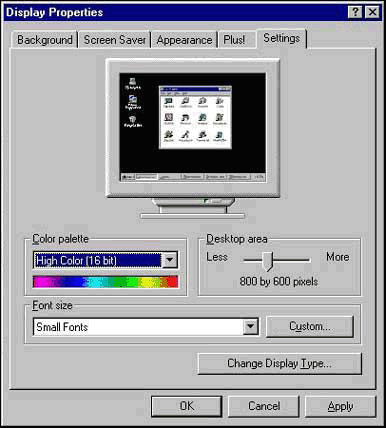
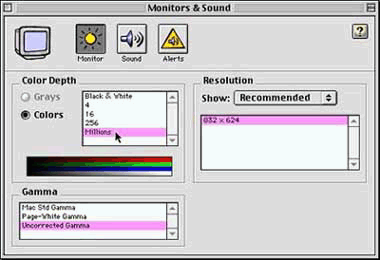
For Mac and PC users ... see the graphics below the following instructions. For Amiga and Unix users ... check with your personal Guru for similar information. |
|
You will need to restart your computer for the new settings to take effect.
|


|
|
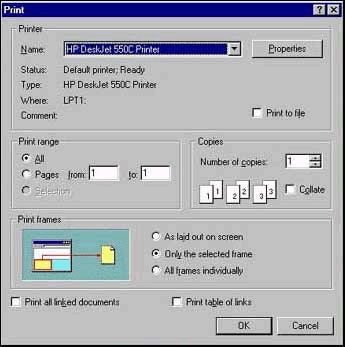
The cursor keys are now activated for movement inside the frame. If a vertical or horizontal scroll bar is present it is immediately available for movement inside the frame. If you activate a "frame" that does not have scroll bars by clicking in it, such as the left hand menu, and then select print (from the browser's file menu), the printer will print the menu, which is the presently active frame, not the contents of the display area in the large frame. Be sure the display area is the active window before a printing request is made. If you can scroll in the frame you know it's active! Using the Netscape browser, you will get "Print Fames" on the pull-down File Menu if you are on a frames page, or simply "Print" on the menu if you are on a non-frames page ... it "knows" where you are, so be careful, be sure which frame is active !!! Internet Explorer will give you another menu, like the one in the graphic below, and force you to make a critical decision in the "Printframes" section of the window! |
|
Also, even if you install high quality TrueType fonts they may still appear ragged looking.
To correct this, right click the desk top, select properties, the "Display Properties" screen comes up,
Go to the Microsoft Typography Web site, and
download
free fonts for use with PC Windows and Apple Macintosh computers
|
Copyright © 1998-1999-2000, The Palo Alto Dental Group